
Feature overview
Keep a copy beyond your phone
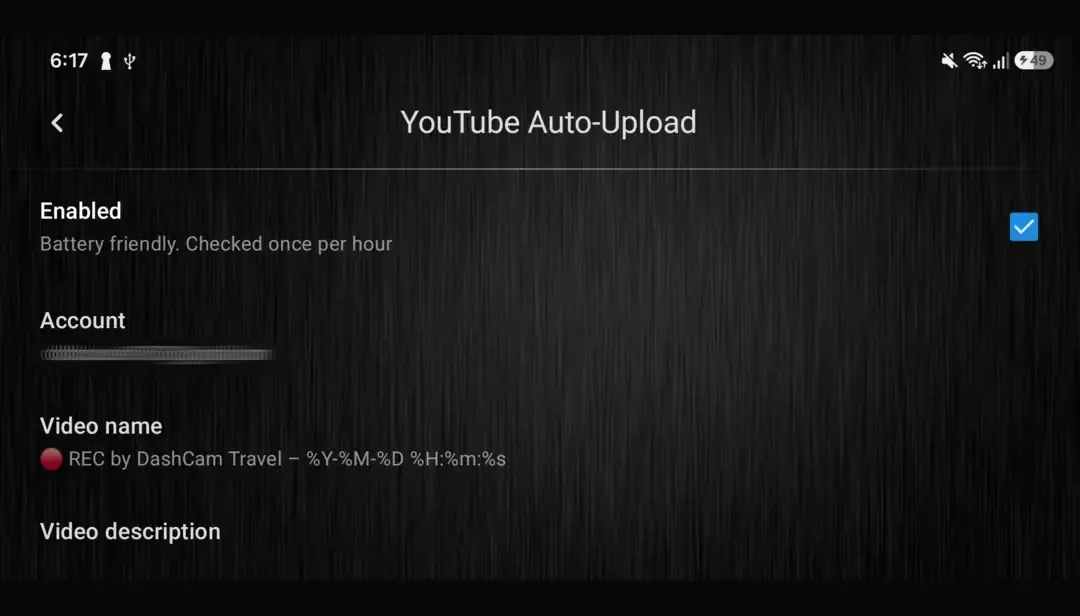
DashCam Travel adds each completed recording to an upload queue. Set the YouTube account, video titles, descriptions and visibility. The video is added to the upload queue, but uploading does not start immediately to save battery. If an SRT subtitle exists, the app sends it with the video.
Quick setup
Set up automatic backup in three steps
- Open Settings → YouTube Auto-Upload, agree to the YouTube terms and select the Google account connected to your channel.
- Optionally set the video name, description and visibility. Decide whether uploads may use mobile data, should wait for charging, or should delete the local video after success.
- Enable Auto-Upload and record normally. Each finished video joins the queue, and DashCam Travel uploads it when the selected conditions are met.
Good to know
Uploads happen after recording, not as a live stream
- The queue is checked approximately once an hour. Android controls the exact run time. During setup, remove DashCam Travel from battery optimization so uploads run reliably.
- DashCam Travel does not provide a separate YouTube channel picker. It uses the first available channel returned for the selected Google account.
- Videos shorter than six seconds are skipped. Unverified YouTube accounts cannot accept videos lasting 15 minutes or more.
- Without a purchase, each activation uploads one queued video and then disables Auto-Upload.
- Private is the default visibility. Review the selected visibility before relying on YouTube as a backup destination.
- Delete video after upload reclaims local storage only after a successful upload. Leave it off when you want both the phone copy and the YouTube copy.
Answers at a glance
Common questions
Can I try YouTube Auto-Upload for free?
Yes. Without a purchase, each activation uploads one queued video and then disables Auto-Upload.
Does YouTube Auto-Upload broadcast a live stream?
No. The feature queues completed video files after recording ends. It does not send a live camera feed to YouTube.
When will a finished video upload?
The queue is checked approximately once an hour. The phone must meet your internet and charging choices, and Android decides the exact background execution time.
Can uploaded videos stay private?
Yes. Choose Private, Unlisted or Public before enabling Auto-Upload. Private is the default. DashCam Travel also lets you set the title and description for uploaded videos.
What should I check when an upload does not finish?
Keep the phone online, confirm that the selected network and charging conditions are met, and make sure DashCam Travel is excluded from Android battery optimization. Open Settings → Others → YouTube log for authorization, duration or connection details. Transient failures can retry later.